What's inside this post: Hide
Kitchen is working on a Website Review feature that pulls a client's website right into your Kitchen portal so they can click anywhere on the page & pin a comment exactly where they want a change. It isn't released yet (as of November 2026), but Kitchen surprised us with a sneak peek of the upcoming feature in a recent video, and I could not be more excited about it! I've been waiting for something like this for almost two years.
Quick backstory, if you missed it: in early 2025, Markup killed their free plan and bumped their paid plans up to $80 a month. That was a hard pass for a lot of us. We weren't against paying for a feedback tool. We were against paying 2 to 4 times what we thought it was actually worth. 🫠
So I went tool shopping. Workflow, BugSmash, Pastel, Webvizio... and that's just the ones I remember. I loved Markup for years, and honestly, nothing has fully replaced it for me. I've been running Kitchen as my client portal this whole time and embedding a separate feedback tool inside of it, which has worked okay.
In this post, I'll walk you through what Kitchen showed us, why I want clients giving feedback on the actual live website, and what it means to finally collect & keep that feedback our portal.
🎥 Prefer to watch? Here's the video version:
Heads up: I'm a Kitchen affiliate, so some links in this post are affiliate links (marked with *). Kitchen didn't sponsor this post or ask me to write it. Full list of my affiliations.
What Kitchen showed in their sneak peek
On October 21, 2026, Kitchen posted a video about redesigning all 61 of their client emails & launching a new email customizer. A cool update on its own, but a couple minutes in, they slipped in a peek at something else entirely, and they absolutely did it on purpose. 😏
The peek starts inside a Kitchen portal, in a folder called "Portal." When you open the Create menu (the list of resources you can add to a folder), there's a NEW option sitting in there called Website Review.
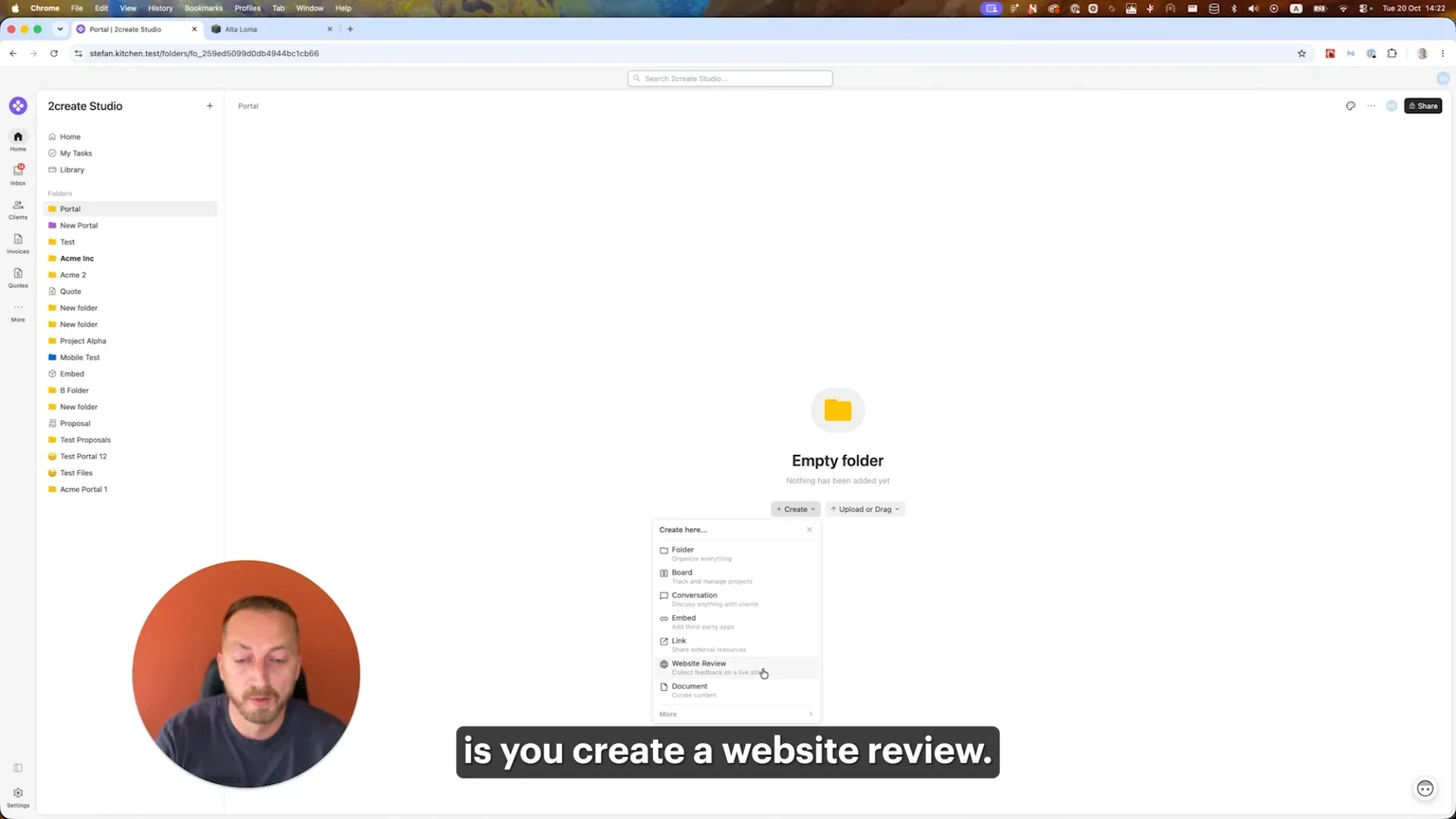
Kitchen's Create menu with the new Website Review option. Screenshot from Kitchen's October 2026 video.
From there, their demo goes like this:
Click Website Review.
Grab the link to the website you want feedback on. (In the demo, it's a Squarespace website.)
Paste the link in, and Kitchen creates a new resource that pulls the whole website into the portal.
Start clicking around the site & pinning comments right onto it, just like we can with files in Kitchen already.
If you used Markup back in the day, that flow probably looks familiar. It's the same simplicity we all loved about it: go to the part of the page you want to talk about, click, and the comment sticks to that exact spot.
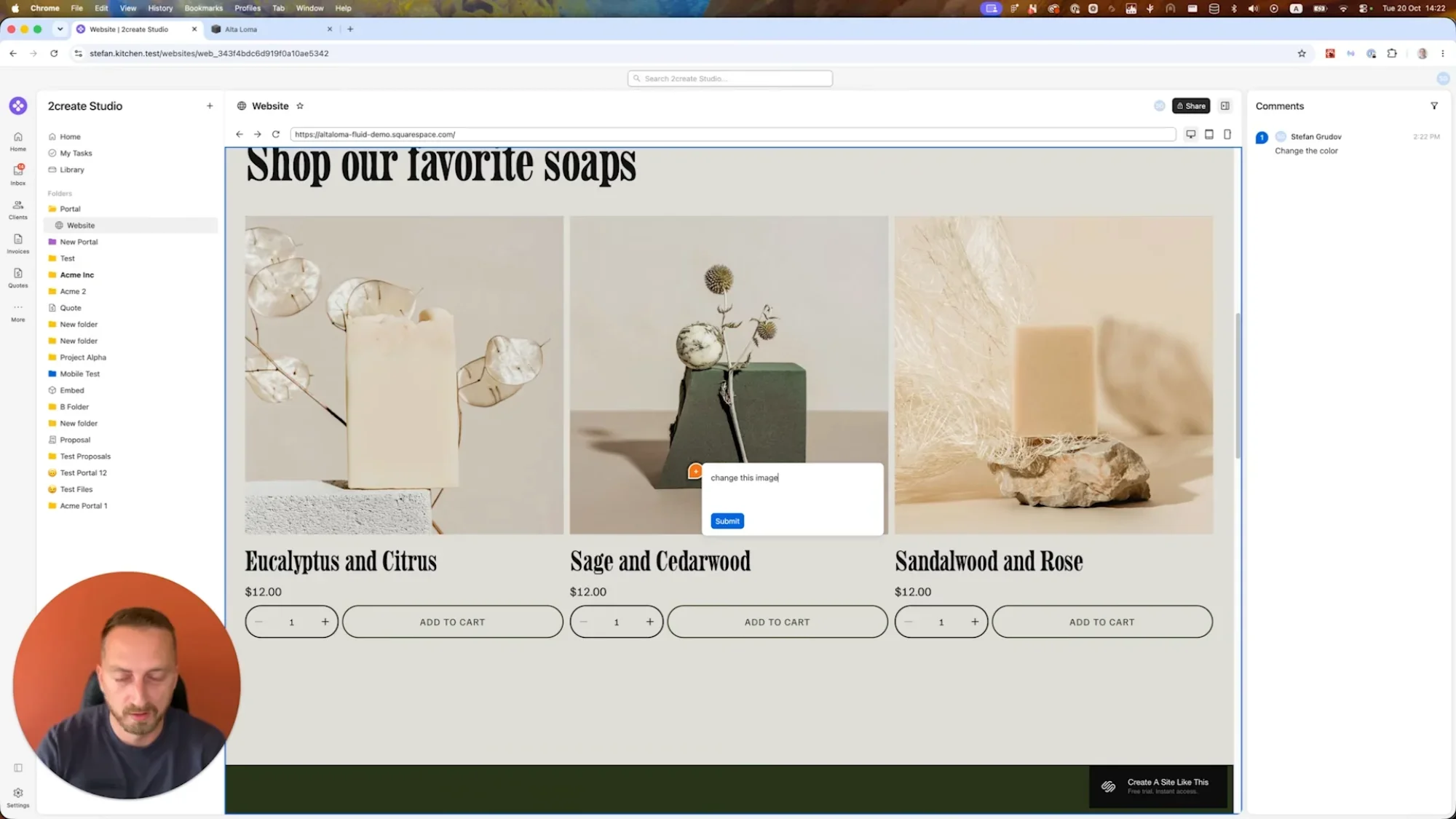
Pinning a comment directly on a product image. Screenshot from Kitchen's October 2026 video.
To be clear, everything I'm describing here comes from seeing the short preview Kitchen gave us in their video. I don't have insider info or early access, and I haven't tested this feature myself yet.
Why I want clients reviewing the live draft website
There are plenty of ways to collect website feedback without a dedicated tool. Google Docs, emails, Loom or Tella walkthrough videos... I've seen (and tried) them all over the years. They all work, some methods or tools just work better than others.
In Video walkthroughs, the client isn't experiencing the site
When you record a video walkthrough of the design and send it over, the client watches you use the website. If they want to leave feedback at a specific moment, they have to pause the video and write down a timestamp. (I use Tella for recording now, but the problem is the same no matter what you record with.)
The bigger issue is that they never click around for themselves. So they don't notice hover effects, they can't help us test whether all the links work, and they don't get a feel for how the site actually moves and flows. Those are exactly the kinds of things I want a second set of eyes on before it launches. By the time we hit the feedback round, I've been staring at that site for way too long, and I need fresh eyeballs to catch what I've stopped seeing.
In docs & emails, you may get "change the image" ...but which one?
With Google Docs (or any doc or email, really), the problem flips. Now the client is clicking around the real site, but then they have to describe where each change goes. And a lot of the time they forget to say where. Or if they do describe it, it's not always 100% clear for us, and then I'm stuck playing detective for a minute before I can make that change. 🕵️♀️
The best of both
What I've found works best is a mix of the two: the client navigates the real website on their own, within a feedback tool, then uses that tool to pin each requested change to the exact spot they're referring to. That's what Markup used to give us. Soon, Kitchen will give us this feature too, just without the separate insane subscription. cost.
Reviewing & replying to comments inside Kitchen
The other half of the sneak peek is what happens on our side once the client is done. The comments show up in a panel on the right side of the website review, so you can scroll through every note in one list.
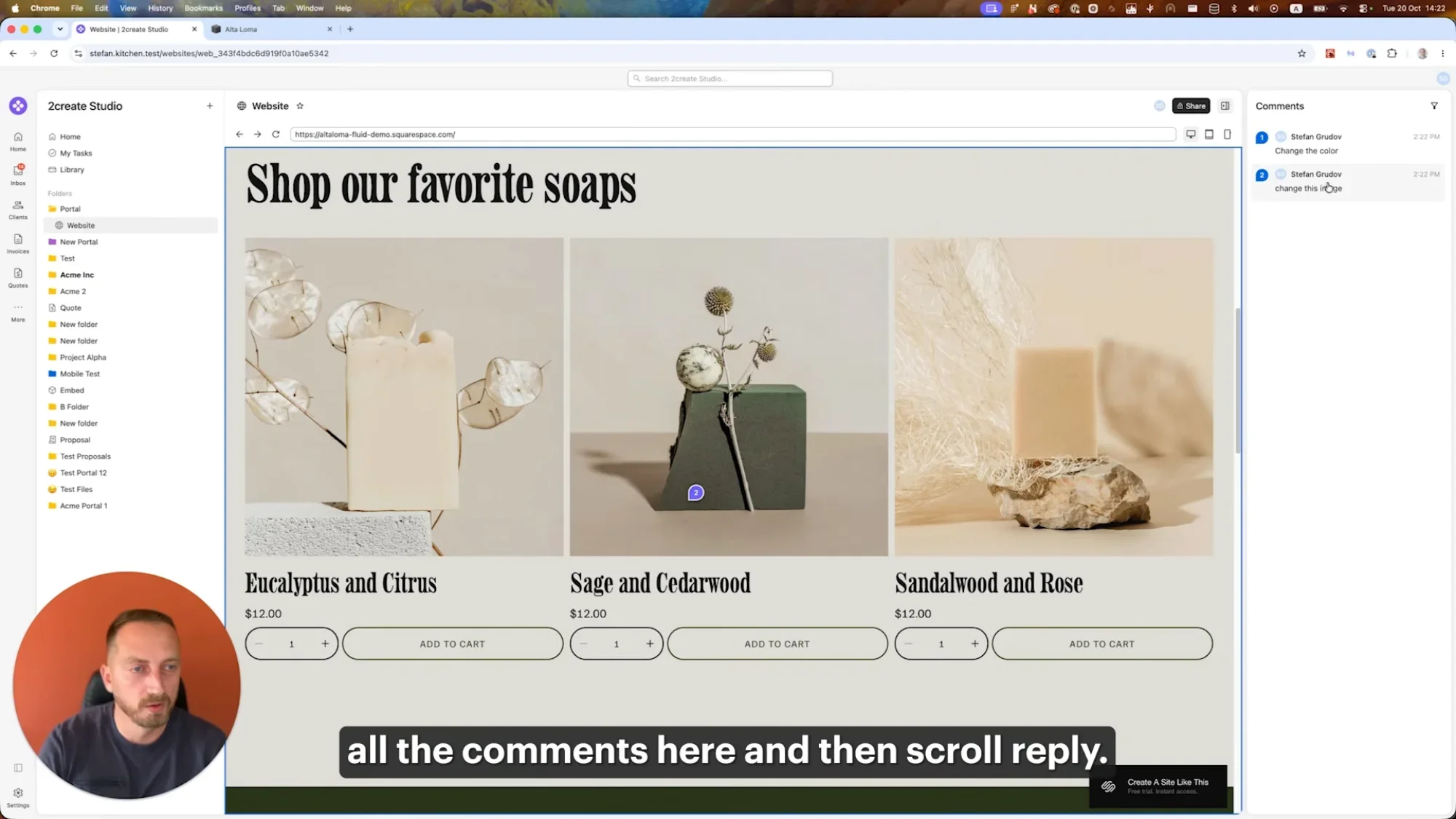
Client comments listed in the panel beside the website. Screenshot from Kitchen's October 2026 video.
From what I could see in the demo, you'll be able to:
Scroll all the comments in that right-hand panel
Jump to the exact spot on the website where the client pinned each one
Reply in a thread when you need more info (because "change this image" might require a follow-up to get the image they want to replace it with)
Filter comments, probably by resolved vs. not resolved, though I'm guessing on that one until it's out
The threads, if included at launch, are a bigger deal than they might seem. When a note is vague, we can reply to their comment to ask for a file attachment or a clarification right on that comment, and the whole conversation stays attached to the part of the site it's about. That means we won't be digging through an email chain to figure out which photo a client meant for us to swap out.
Kitchen already lets clients comment like this on files: PDFs, JPEGs, brand boards, photography. Websites were the missing piece!
What this means for our workflow
Once this feature is released, we won't need a dedicated third-party website feedback tool anymore! It's still good to have one in your back pocket for unique cases, and for that I'll be using BugSmash myself, but for simple website feedback, we'll be able to do that in Kitchen.
One less subscription
Many of us (me included) bought a lifetime license to Kitchen. Kitchen has said existing lifetime customers keep their access even after lifetime plans go away for new customers. Once it's released, we're not forced to pay for Markup, Workflow, BugSmash or anything else to do this job, and that is money back in our pocket every month. 💸
The savings matters more than ever, when everything is a subscription & all prices seem to be rising at the same time.
Plus, I'm tired of tools jacking their prices up on us. Bending Spoons (the company that recently acquired so many of our favorite tools, like Vimeo, StreamYard, Evernote, Harvest, & now Airtable too) is a perfect example of what I'm talking about. Their playbook is clear: buy the company, lay off way too many people, then jack up the prices to INSANE (arguably illegal rates) with little notice to or regard for their customers. 🤬
Tools that offer lifetime deals & actually treat their customers well are worth their weight in gold right now!
Less setup, fewer links
Right now, a website feedback round means setting the project up in a second tool, generating a separate link and introducing my client to yet another piece of software. With feedback built into the portal, I can skip all of that. The website review lives in the same environment as everything else for that project.
One place for the client
Clients already log into one portal to manage everything they're working on with me. They don't need to learn (or remember a login for) a separate feedback tool. It's all branded & matches the rest of their experience with my business.
Searchable feedback
This one's small, but useful, because when the feedback lives inside Kitchen like everything else, I can search for a specific comment request from the search bar, the same way I'd search for a file or a message. That makes it easy to reference something quickly when we need to.
Fewer tools in the stack
I still use Dubsado for booking my service work with clients, onboarding and support reminders, but I move clients into Kitchen for the active part of the work delivery process.
So I'm using three tools: Dubsado, Kitchen and a feedback tool like BugSmash or Workflow. Once this launches, it can go down to just two.
To be fair, those other feedback tools aren't bad & most have a lot more features than Kitchen's is likely to have. Some of you love yours, and if that's you, keep it! But the more I can keep inside the portal, the easier it is for everyone, especially when each piece of that one tool works really well.
When does it launch?
I have no idea. 🤷♀️ Kitchen hasn't announced a date, and like I said, I don't have any inside info. My guess is it's coming soon, because ya don't tease one of their most requested features in a public video unless its release date is close. When it's released, I'll share a full walkthrough.
How to get Kitchen (+ a Black Friday deal)
If you don't have Kitchen yet, you can start with Kitchen's free plan here*.
If you're buying during November 2026, Kitchen is running a Black Friday sale: use code BF20 at checkout for 20% off a lifetime plan. That brings the lower-tier lifetime plan to about $240 and the higher tier to about $480, so you'd save roughly $60 to $120. And then you never pay for it again, including features like this one when they're released. 🤯
Kitchen's lifetime plans are also retiring for new customers (no date announced yet), so if lifetime is what you want, now's a good time to grab it.
Want help setting up your portal?
If you want to use Kitchen but don't know where to start, that's exactly what my course is for. The Ultimate Client Portal System comes in two parts, and you can buy them together as a bundle or grab just the one you need:
Part 1: Foundations. The Kitchen tutorials, so you know how to set everything up.
Part 2: Systems & Processes. My templates, checklists, guides & step-by-step walkthroughs, plus how I connect Breely for scheduling & Dubsado for getting clients into Kitchen.
There's a lot of copy & paste in there, so you can take what I use, make it your own and get set up way faster than building from scratch. A few students have told me they set up their portal in about a weekend or a week. Here's what Kimberly said:
Individual results vary. How long setup takes depends on your project & how much you customize.
FAQs
Is Kitchen's Website Review feature available now?
Not yet. As of November 2026, Kitchen has only shown it in a sneak peek inside their October 2026 email customizer video. There's no public release date.
Will Website Review cost extra?
Based on what Kitchen has shared so far, it's being added to the platform, not sold as a paid add-on. I'll confirm once it's released, since I haven't seen official pricing details for the feature itself.
Is Kitchen a good Markup alternative?
For website feedback, not yet, since the feature isn't out. Once it is, it looks like it'll cover the core thing most of us used Markup for: clients clicking around a real website & pinning comments exactly where they want changes. The difference is that it lives inside your client portal instead of being one more subscription or tool to log into.
Can clients already leave feedback on files in Kitchen?
Yes. Kitchen already supports comments on files like PDFs, JPEGs, brand boards and photography. Websites are the piece that's been missing.
Does it work with Squarespace websites?
The demo in Kitchen's video uses a Squarespace template, so it looks like Squarespace sites will work. I'll test it with my own client sites once it's available.
Do I need a lifetime plan to get this feature?
I don't know yet which plans will include it. What I do know: lifetime customers get new features like this at no extra cost, and Kitchen's free plan* is a good way to try the portal in the meantime.
What should I use for website feedback until it launches?
Whatever's working for you! I've tested a bunch of options, and I compare several of them in this video on Markup.io alternatives. If you're already using Workflow, Pastel or another tool & you love it, there's no reason to switch.
If you're as excited about this as I am, tell me what you're using for website feedback right now. And when Website Review finally launches... well, I'll see you in the Kitchen. 😉😂